




Error 0x8007007B: “DNS name does not exist” when activating Windows
You try to activate Windows and get:
“Error code: 0x8007007B. The filename, directory name, or volume label syntax is incorrect” or, from Command Prompt, “0x8007007B DNS name does not exist.”
Despite the wording, nothing is wrong with your files or your internet. Windows is set up to activate through a company activation server and can’t find one. On a home PC that server doesn’t exist, so the fix is to switch Windows to a normal retail license.
Error 0x8007007B during activation means Windows is set up to activate through a company KMS server it can't find, usually because a volume license key is installed. Check how Windows is licensed, then switch to a retail key in Settings → System → Activation → Change product key. On a work or school PC, ask your IT department instead.
Watch: fix error 0x8007007B step by step
Prefer watching? This video shows the error, what the KMS server has to do with it, how to check with slmgr /dlv, and how to switch to a retail key in Settings or with slmgr /ckms, /ipk and /ato.
Watch on the KRBKeys YouTube channel →
Short on time? Watch the short version
The same fix in a quick vertical video made for phones. Open it on YouTube Shorts →
What does error 0x8007007B mean when activating Windows?
Businesses activate their PCs through their own KMS (Key Management Service) server. A PC set up this way looks the server up in the company network’s DNS. When it can’t find it, activation fails with 0x8007007B (or the closely related 0x8007232B). Microsoft lists two typical causes:
- A volume or Enterprise key is installed on a home PC, for example a PC that came from a company, or a Windows copy installed with a volume key.
- A work PC isn’t connected to the company network, so it can’t reach the activation server.
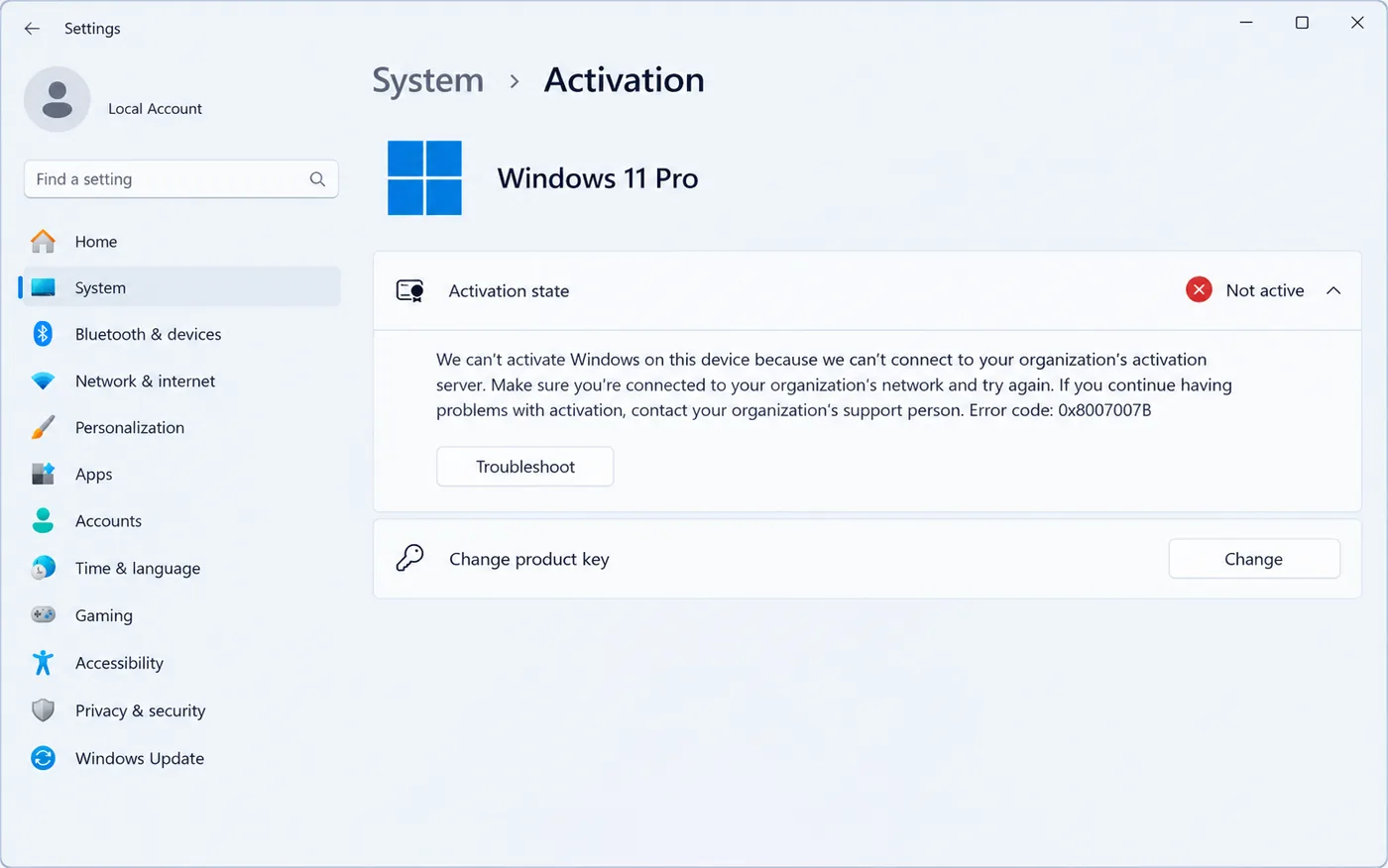
Step 1: Check how Windows is licensed
- Click Start, type
cmd, right-click Command Prompt and choose Run as administrator. - Run
slmgr /dlv. After a few seconds a window opens. - Look at the Description line. If it says VOLUME_KMSCLIENT channel, Windows is set up for a company KMS server, and that is the cause.
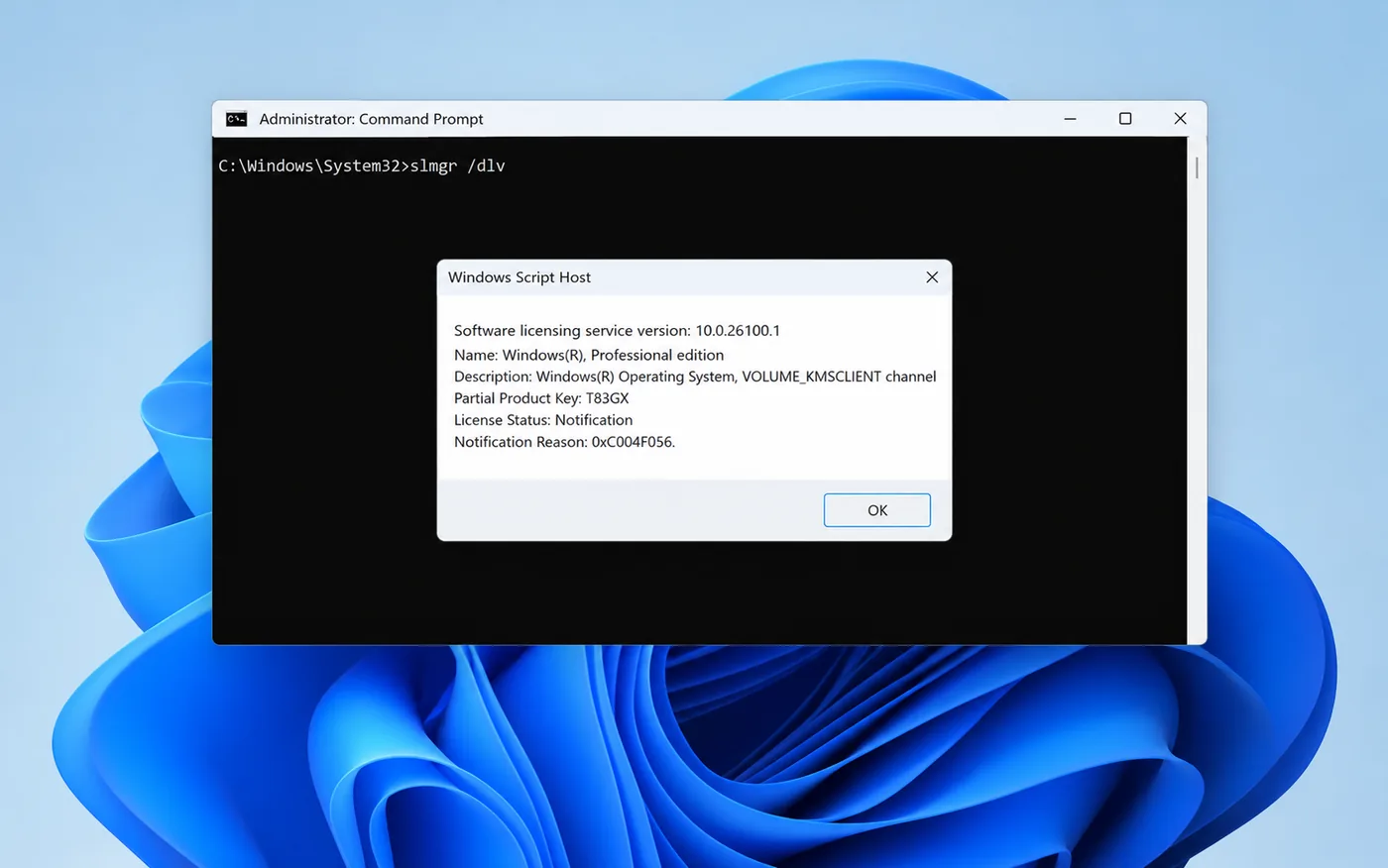
Also check Settings → System → About → Edition. If it says Enterprise, note that a Home or Pro key can’t activate it (see the FAQ below).
Step 2: Switch to a retail key
Replacing the volume key with a retail key makes Windows activate directly with Microsoft, with no company server involved.
Easiest way:
- Go to Settings → System → Activation.
- Click Change product key, enter your 25-character retail key, and click Next, then Activate.
If that doesn’t work, use Command Prompt as administrator:
- Remove the old company server address:
slmgr /ckms - Install your key:
slmgr /ipk XXXXX-XXXXX-XXXXX-XXXXX-XXXXX - Activate:
slmgr /ato
Restart and check the Activation page. It should say Windows is activated with a digital license. The same steps fix error 0xC004F074, which has the same cause.
If this is a work or school PC
If the PC still belongs to your employer or school, don’t change the key. Connect to the company network (or VPN) and let it activate, or contact your IT team. Administrators can point the PC to the right server with slmgr /skms followed by the KMS host name.
Fix 0x8007007B for good with a genuine retail key
A retail key activates directly with Microsoft, so Windows never needs a company activation server again.
- ✔ Windows 11 Pro keys are delivered instantly by email
- ✔ Windows 10 Pro keys usually arrive within 2–10 minutes
- ✔ Free help if activation doesn’t go through
Frequently asked questions
Is 0x8007007B a network or DNS problem on my side?
Almost never on a home PC. Your internet works; Windows is simply looking for a company activation server that isn’t there. Switching to a retail key is the real fix.
My PC says Windows Enterprise. Can I activate it with a Pro key?
No. A Pro key doesn’t activate Enterprise. You would need to reinstall Windows Pro (keep a backup of your files first) and then activate it with your Pro key.
Will changing the product key delete my files?
No. Changing the key only changes the license. Your files, apps and settings stay as they are.
What is the difference between 0x8007007B and 0x8007232B?
They mean the same thing: Windows can’t find a KMS server. The fix is the same for both. See our 0x8007232B guide for the exact messages and the Office version of the error.


























