


Windows Activation Errors 0xC004F212 and 0xC004F210: Wrong Edition Key – How to Fix It
Five codes share one cause: 0xC004F212, 0xC004F210, 0xC004F034, 0xC004E016 and 0xC004F00F. The product key (or digital license) is for one edition of Windows, and a different edition is installed. A Pro key on Windows Home is the classic case.
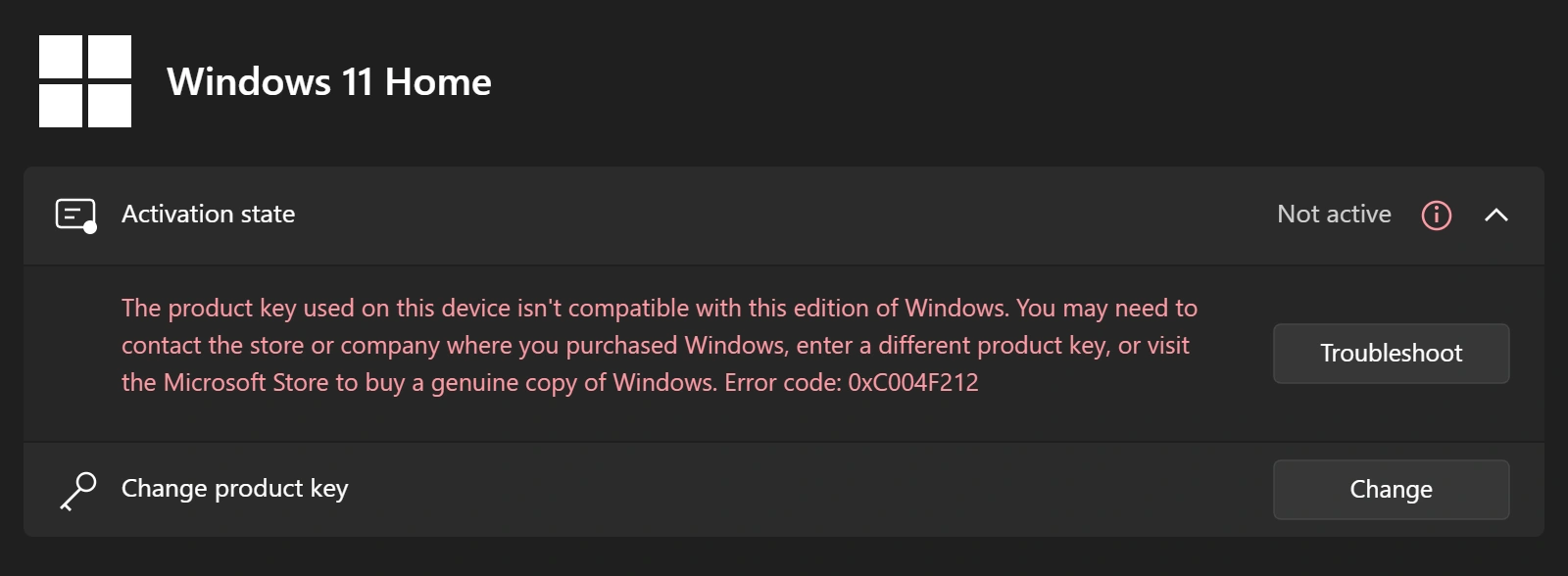
Errors 0xC004F212, 0xC004F210, 0xC004F034, 0xC004E016 and 0xC004F00F all mean the product key and the installed Windows edition do not match. Check your edition under Settings, System, About. Then either enter a key for the edition you have, or switch Windows to the edition your key is for. Moving from Home to Pro does not need a reinstall.
Which code means what?
- 0xC004F212: the product key used on this device isn't compatible with this edition of Windows. Typical after reinstalling and choosing a different edition from the one you're licensed for.
- 0xC004F210: the key is for a different edition, or your digital license is for a different edition than the one now installed.
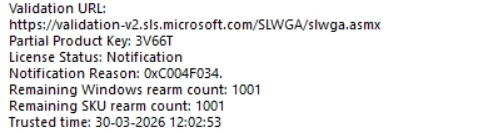
- 0xC004F034: the key is invalid, or it is for a different version of Windows.
- 0xC004E016: the key is for a different version or edition, for example an Enterprise key on Windows Home.
- 0xC004F00F: an Enterprise edition key was entered on Windows Home or Pro.
Step 1: Check which edition is installed
Go to Settings → System → About and read Edition under Windows specifications. Compare it with the edition named on your order or key card: Home, Pro, Enterprise or Education.
Step 2: Pick the fix that matches
- Your key is for Pro and Windows Home is installed. Go to Settings → System → Activation → Change product key and enter the Pro key. Windows upgrades the edition in place and keeps your files and apps. If it stops with error 0x803FA067, follow our Home to Pro guide.
- Your key is for Home and Windows Pro is installed. A Home key cannot activate Pro. Either get a Pro key, or reinstall Windows and choose Home during setup.
- You reinstalled Windows and picked the wrong edition (0xC004F212, 0xC004F210). Go to Settings → System → Activation → Troubleshoot. If the troubleshooter finds a digital license for another edition, it tells you and offers to install the right one.
- Your key is for Enterprise or Education (0xC004E016, 0xC004F00F). Those keys only work on those editions, and they are normally volume keys managed by an organization. On a home PC, use a Home or Pro key instead.
- The edition is right and you still get 0xC004F034. Paste the key again in case of a typo, and check the key is for the right Windows version (a Windows 8.1 or Windows 7 key will not activate a clean install of Windows 11). If your PC belongs to an organization that uses a KMS server, ask its IT support.
If You Bought Your Key From KRBKeys
Check that the product name on your order matches the edition in Step 1. If you ordered the wrong edition, or the right key is refused, email support@krbkeys.com with your order number, the error code and your installed edition. We'll sort out the right key with you.
Need a Windows key?
Retail keys with fast email delivery and free replacement if activation fails.
Frequently Asked Questions
Can I use a Windows 10 key on Windows 11?
Yes, if the edition matches: a Windows 10 Pro key activates Windows 11 Pro.
Do I have to reinstall to go from Home to Pro?
No. Entering a valid Pro key under Change product key upgrades the edition in place.
Can I go from Pro back to Home without reinstalling?
No. Moving down an edition needs a clean install of Home.
Is my key bad if I see one of these codes?
Usually not. The key is valid for a different edition than the one installed.
Do these codes appear on both Windows 10 and Windows 11?
Yes, with the same causes and fixes.